Mnemor is an iPhone app that connects to your Gmail, Google Calendar, Slack and GitHub accounts, works out the few things that genuinely need you, and lets you reply, approve and clear them from one short list — without opening another app.
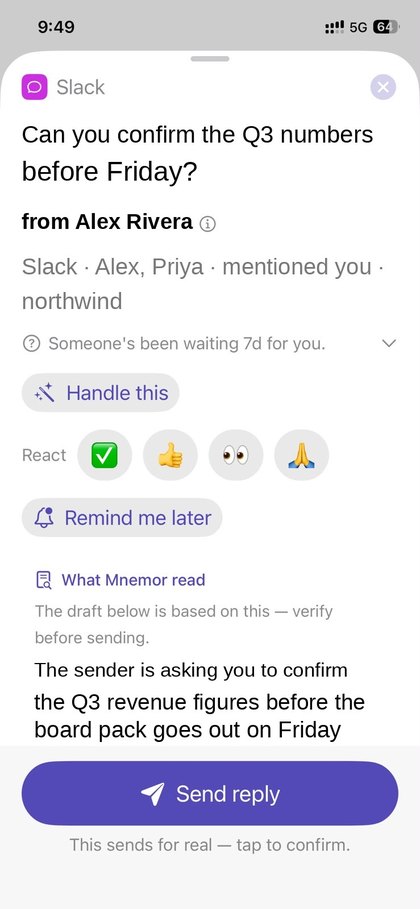
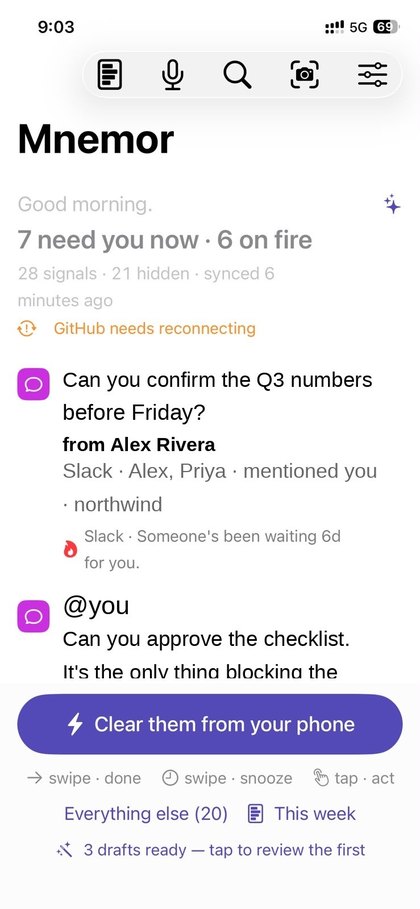
Your work arrives in a dozen places, and most of it does not need you. Mnemor connects to the accounts you already use, reads what is unanswered or due, ranks it by who has been waiting on you longest, and shows a single short list. From that list you reply to an email or a Slack message, approve a pull request, answer a calendar invitation or mark a reminder done — in place, in a tap.
Everything is stored on your iPhone. There is no Mnemor account and no server holding a copy of your mail.
Open an item and the reply is already drafted, with the thread summarised above it. Approve a pull request, answer an invitation, react or snooze — from the card or the lock screen. Nothing is sent until you tap.
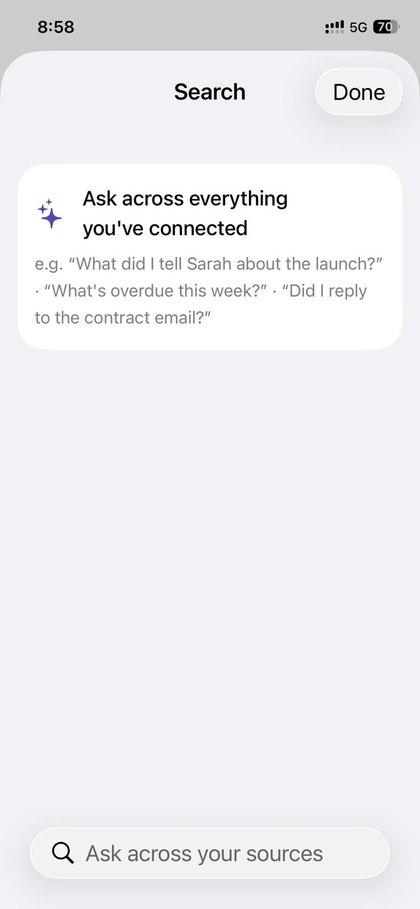
“What did I tell Sarah about the launch?” — by text or voice, across mail, chat, your meeting notes and the people you've met. Matching happens on the phone.
Meetings transcribe on-device into a summary plus what you agreed to. Boarding passes sit behind Face ID. A short sweep before you log off.
Connecting your Google account is optional. Mnemor uses Gmail data to identify messages that may need your attention, and to let you read a thread, archive a message, or send a reply you have explicitly approved. It uses Google Calendar data to show upcoming events and to submit the invitation responses you choose. Your Google Account email address is used only to identify the connected account.
Mnemor does not sell Google user data, use it for advertising, or use it to train AI models. You can disconnect at any time. Here is the permission-by-permission detail; the full policy is in our privacy policy.
| Permission requested | What Mnemor does with it |
|---|---|
gmail.modify |
Reads the sender, subject and snippet of unread mail so it can show you who is waiting on a reply, and marks a message read or archives it when you clear the item. Mnemor never deletes your mail. |
gmail.send |
Sends the reply you have written and confirmed. Mnemor never sends anything on its own — a draft is only ever sent by your explicit tap. |
calendar.events |
Reads your upcoming events so it can show what is due today and brief you before a meeting, and sends your RSVP when you answer an invitation. |
userinfo.email |
Reads your email address, purely to label the account in the Sources list so you can tell two connected accounts apart. |
Google data is used only for the features above, and is stored on your iPhone rather than on a server. Mnemor's use of information received from Google APIs adheres to the Google API Services User Data Policy, including the Limited Use requirements.
Turning it off. Disconnect at any time in Settings → Sources — that deletes the stored credential and removes that account's items from the app. You can also revoke Mnemor's access from Google's side at myaccount.google.com/permissions. Because no copy of your mail is kept on a server, deleting the app removes everything.
Privacy policy:
https://mnemor.app/privacy
Terms of service:
https://mnemor.app/terms
Both are public pages on this domain. No sign-in is required to
read either of them, or any page on this site.

A fair question, and the honest answer is: only if you let it, and only the specific excerpt needed for something you asked for. Mnemor never uploads your mailbox or your Slack history. You pick one of three modes, and you can change it at any time.
Worth knowing first: the ranking itself never uses AI. Working out what needs you, who has waited longest and what is urgent is deterministic code running on your phone. AI is only involved when you ask for something extra — a drafted reply, a thread summary, meeting notes. If you never tap those, nothing is ever sent.
| Mode | What leaves your phone |
|---|---|
| On-device only One switch in Settings |
Nothing. Ranking runs on deterministic rules and Apple's on-device model. No request reaches any AI provider — enforced in one place in the code, not a preference the app can forget. Cloud-only features simply stand down. |
| Built-in AI The default |
When you ask for a draft or a summary, that one excerpt — a message snippet, a thread, a transcript — goes to Anthropic to produce the result, then it is done. It is not stored by us, not used for advertising, and not used to train models. Every request is listed in the in-app activity log with its destination and rough size. |
| Your own key Enterprise |
Paste your own Anthropic API key and Mnemor calls Anthropic directly with it. The traffic runs under your account and your own agreement with Anthropic. The key never leaves your Keychain and never touches our servers. |
In every mode, some things never leave the device at all: images and documents (there is no image path in the app — receipts, badges and travel documents are read with on-device text recognition), meeting audio, your Health data, and your credentials. How it works walks through every workflow step by step and lists every AI call the app can make.
Unanswered mail, and invitations you can RSVP to. Multiple Google accounts.
DMs and mentions you owe a reply to, across multiple workspaces. Reply or react in place.
Reviews blocking others, issues assigned to you. Approve, comment or merge from your phone.
What is due today, read entirely on-device, including recurring items done per-occurrence.
Sleep and recovery, used only to time your day. Read on-device, never transmitted.
Receipts and event badges detected with on-device text recognition. Share anything into Mnemor, or watch a folder.
Bring your own tools. Browse the registry or paste a server URL; requests go straight from your device.
Ranked by who has waited longest. Real obligations always outrank noise — a newsletter can never crowd out a person.
Reply, approve, RSVP, archive, react, mark done — one tap, and directly from the lock screen.
Replies prepared ahead of time, or tap Handle this to pull the thread and propose times from your calendar. You always confirm.
Record and it transcribes on-device into a summary plus the action items you took on. Audio never leaves the phone.
It hears the promises you make, tracks the replies you are owed, and sweeps both before you log off.
Ten minutes ahead: who is coming, what you last discussed, and what is still open with them.
Back from a break? A short read on what changed and the few things that now need you.
Natural-language search — by text or voice — across every source you have connected, plus your own notes and meetings.
Scan a badge or card at a conference. It reads the name and company on-device, then drafts your follow-up and paces the reminders.
Receipts totalled from your photos, AI spend watched for spikes, and security advisories matched to the tech you actually run.
Boarding passes and trip documents, read on-device and sealed behind Face ID. Never uploaded, never in a backup.
After hours it goes quiet, letting only the genuinely urgent through, and tells you when you are clear.
Mnemor has no account and no server-side copy of your data. Everything lives on your iPhone, encrypted, with credentials in the Keychain. Photos and documents are read with on-device text recognition and never sent to any AI model — there is no image path in the app at all. Turn on On-device AI only and nothing reaches the cloud; bring your own Anthropic key if you would rather use it. Every AI request is listed in an activity log, and one tap erases everything. Read the security overview.
Mnemor is an iPhone application for iOS 17 and later, currently in pre-release testing ahead of distribution on the Apple App Store. This site, mnemor.app, is its official home and is operated by us — it is not hosted on any third-party publishing platform. Support and contact: @saysereze on X, or the support page.
Screenshots show the app running with example content in place of real messages. Mnemor is an independent product and is not affiliated with, endorsed by, or operated by Google, Microsoft, Slack, GitHub or Apple.
 Mnemor